Adding a .onion Mirror to a Cloudflare-Fronted Site: A Guide to the Onion-Location Header
How it differs from Cloudflare's built-in Onion Routing toggle — with real dashboard screenshots
Many Tor users hit sites fronted by Cloudflare through an exit node, which often means slower load times and frequent CAPTCHA challenges. That's exactly why sites like the New York Times, the BBC, and DuckDuckGo run their own .onion mirrors — when Tor Browser detects an Onion-Location response header, it prompts the visitor to switch straight over.
This guide walks through adding that same capability to an existing site sitting behind Cloudflare.
Onion Routing toggle vs. a dedicated .onion service
Cloudflare ships a built-in Onion Routing toggle under Network settings, available on every plan from Free through Enterprise. It's easy to miss what it actually does: it routes Tor traffic through Cloudflare's own shared onion circuit (via an alt-svc header) to skip exit nodes — it does not give your site its own dedicated .onion address.
What we're setting up here is different: a .onion hidden service you control, advertised to Tor Browser via a real Onion-Location header. The two features solve related but separate problems, and it's worth being explicit about that distinction — a lot of write-ups on this topic conflate the two.
Step 1: Create a Tor hidden service
Add the following to /etc/tor/torrc:
HiddenServiceDir /var/lib/tor/example_service/
HiddenServicePort 80 127.0.0.1:8080
Restart Tor, and your .onion address will appear in the hostname file inside that directory. If you'd rather have a memorable or brand-relevant address instead of a random string, a vanity address generator such as mkp224o can produce one — budget some compute time and patience for longer prefixes.
Point HiddenServicePort's target (127.0.0.1:8080 above) at a reverse proxy — nginx works fine — that forwards to your actual site.
Step 2: Set the Onion-Location header in Cloudflare
- In the Cloudflare dashboard, go to Rules → Transform Rules → Modify Response Header.
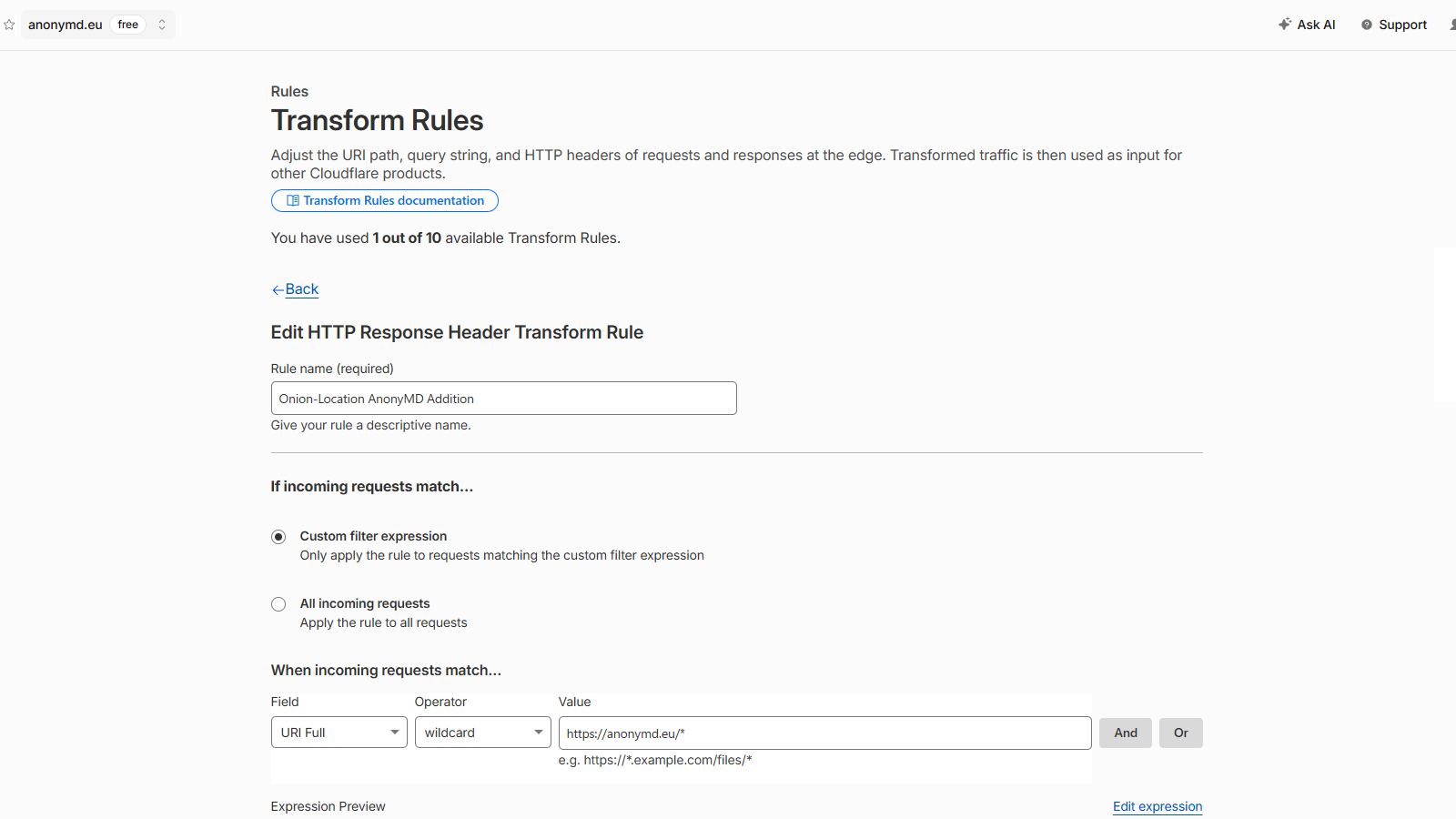
- Under "If incoming requests match," choose Custom filter expression and scope it to your site (e.g.
URI Fullwildcardhttps://your-domain.com/*). - Click Add dynamic, set the header name to
Onion-Location, and set the value to:
concat("http://xxxxxxxxxxxxxxxxxxxxxxxxxxxxxxxxxxxxxxxxxxxxxxxxxxxxxxxx.onion", http.request.uri.path)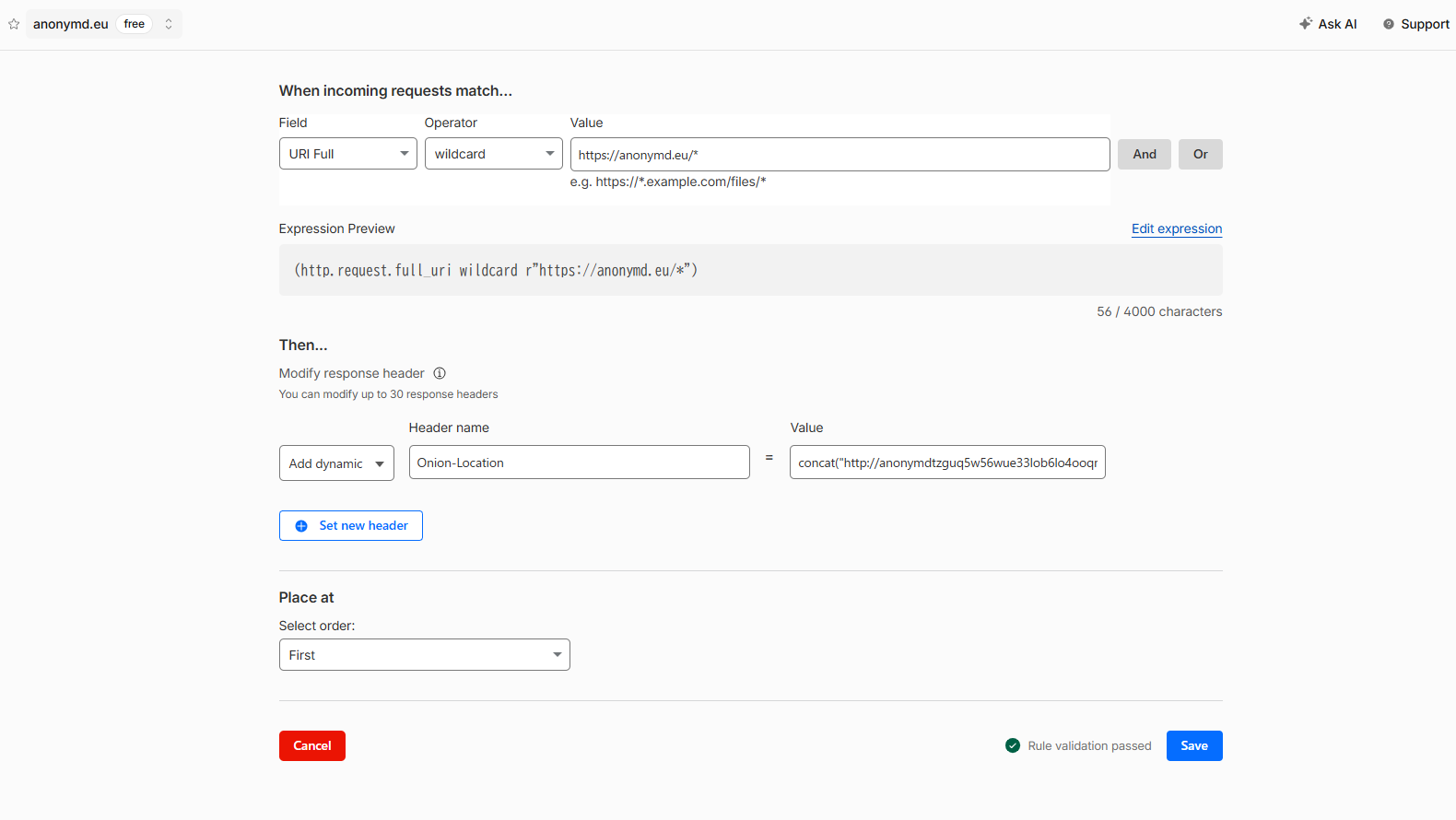
This generates the correct .onion URL for whatever page the visitor is currently on. It works on the Free plan — Transform Rules gives you 10 rules at no extra cost, and this only needs one.
Real-world example
Here's the exact rule running on anonymd.eu:
concat("http://anonymdtzguq5w56wue33lob6lo4ooqmcsewlxz4cwb5zdvns4n6ouyd.onion", http.request.uri.path)Bonus: preserving the query string
http.request.uri.path only returns the path — it drops anything after ?. For most pages that's fine, but if query parameters matter (search results, pagination), add a third argument:
concat("http://xxxxxxxxxxxxxxxxxxxxxxxxxxxxxxxxxxxxxxxxxxxxxxxxxxxxxxxx.onion", http.request.uri.path, http.request.uri.query)Summary
- Cloudflare's Onion Routing toggle and a dedicated
.onionservice +Onion-Locationheader solve different problems — don't confuse the two. - Transform Rules works on the Free plan, no upgrade required.
- Add a third
concat()argument if you need to preserve query strings.
Setting up your own .onion mirror, or want to see our track record first? Find AnonyMD on XMRBazaar: [ https://xmrbazaar.com/listing/tRp6/ ]